In Bookeo, you can set which taxes apply to your memberships.
1. Go to Marketing>Memberships
2. Click on a membership, go to the Taxes section and set if:
-
All taxes apply (by default)

-
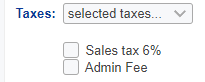
Selected taxes apply
Tick the taxes applying to the specific membership
-
No taxes apply
